
Integrate pricing datawithout major IT projects
.avif)
Most pricing projects begin with a simple import of files that are already exportable, not with an API integration. There are three levels of integration (file import, scheduled connector, real-time API integration), and the lack of a connector should never be a reason to postpone a pricing project.
This approach of a gradual rollout—without getting bogged down in IT issues—is what BOOPER’s Change Management module supports.
“How do I integrate a pricing engine into my ERP or PIM?” This question often seems more daunting than it actually is. Many retailers put off a pricing project because they imagine it will require a major IT overhaul first, when in fact most projects start with much less than that.
This guide details the three possible levels of integration—from the simplest to the most advanced—and explains why the lack of a connector should never be a reason to postpone a project.

The Myth of the Major IT Project That Must Be Completed First
A common reaction when a pricing project is brought up is to first focus on the technical complexity: which connector to use with the ERP, how to synchronize the PIM, and how much development time the IT department will need. This tendency sometimes turns a business project into a dreaded IT undertaking—one that gets put off.
This is a sequencing error. Virtually all retail information systems already generate usable exports for other purposes: POS files, pricing reports, and catalog exports in CSV or Excel format. Even without a dedicated connector, these files are sufficient to launch a pricing project.
What a Pricing Project Really Requires from the IT Side
A product catalog export is essential. SKU, description, current price—most ERP systems and point-of-sale systems already generate this data for other purposes.
A sales history—even an incomplete one—is essential. You don't need a complete history to get started; a summary covering several months is sufficient.
Useful, doesn't get in the way, and features automated synchronization. It's convenient once the project is up and running, but regular manual imports allow you to get started without it.
Optional at the outset: real-time API integration. Useful in the long run, but rarely necessary to validate the approach.
Three levels of integration, from the simplest to the most advanced
| Level | What this means | Who to mobilize | Typical turnaround time |
|---|---|---|---|
| Importing Files | Takeover of existing exports, without further development | Business Teams | Days |
| Planned Connector | Automatic Synchronization at a Specified Frequency | Business + Ad-Hoc IT | Weeks |
| API Integration | Continuous synchronization, dedicated development | CIO from the scoping phase onward | Month |
To put it this way: most projects start at Level 1 and become more sophisticated as they progress. Requiring Level 3 before starting delays the project without providing a commensurate benefit.
Start with the files we already have
At Booper, the BOOPER Data Loader allows you to integrate available files (point-of-sale exports, pricing, catalog) without requiring an API connector or any heavy technical prerequisites on the client side. Existing data serves as the starting point for the project, allowing you to get started in a matter of days rather than months.
The Shift Toward Greater Accessibility Without a Major Project
According to Gartner's forecasts, low-code will account for 75% of new enterprise application development by 2026—a shift driven in particular by users outside traditional IT teams.
This development aligns directly with the concept of a file-based entry point for a pricing project: technical integration is no longer a prerequisite handled exclusively by the IT department, but rather a step that business teams can initiate on their own.
Ensure secure integration without blocking startup
1. Identify the exports that have already been generated (accounting, reporting, inventory management).
2. Start by importing data manually on a regular basis; a weekly or monthly schedule is more than enough.
3. Document the formats to prepare for the future, even if there isn't an immediate connector.
4. Involve the IT department only when the need becomes clear, once the value has been demonstrated.
Mistakes That Turn a Pricing Project Into an IT Project
- Require API integration before getting started. This prerequisite delays the project by several months.
- Wait until the IT department is available rather than starting with a file import. Both can proceed in parallel.
- Choose a provider that only supports API integration. This eliminates any possibility of a quick start.
- Failing to document the formats used at the outset. This makes it more difficult to transition to a more automated integration later on.
Frequently Asked Questions
There are three levels: importing files that can already be exported without a connector, scheduled synchronization via a standard connector, or real-time API integration. Virtually all retail information systems already generate usable exports (point-of-sale files, price lists, catalog exports) for other purposes, which are sufficient to get started without waiting for the most advanced level.
No, in most cases. An entry point that accepts existing exports allows you to get started without an API connector. Requiring API integration before getting started is one of the most common mistakes: it delays the project by several months without a commensurate benefit, whereas most projects start at the simplest level and gradually increase in sophistication.
File import leverages existing exports without requiring technical development. API integration synchronizes data continuously. In between, a scheduled connector enables automatic synchronization at a defined frequency, involving IT on an ad hoc basis without requiring dedicated development—a useful intermediate step once the project is launched, but rarely necessary for its validation.
When starting with file imports, business teams are often sufficient, without involving the IT department early on. The proper approach is to involve the IT department only when the need becomes concrete—once the project’s value has been demonstrated based on the initial imports—rather than as a prerequisite that determines whether the project can be launched.
No, a file-based entry point allows you to get started without a connector and gradually improve the reliability of the project’s integration in parallel. This shift is part of a broader trend: Gartner predicts that low-code will account for 75% of new enterprise application development by 2026, driven in particular by users outside traditional IT teams.
The foundation: sales history, current prices, purchase costs, product catalog, and, if possible, competitors’ prices and past promotions. Incomplete data shouldn’t prevent you from getting started: load what’s available first, then work on improving its reliability. Check the quality of the data.
Three modes: file import (point-of-sale exports, pricing, catalog), API connectors to the ERP or PIM, and reading from a data lake. File import allows you to get started without an IT project. The CRM is primarily used for B2B, for customer-specific pricing.
See also in this series: Before rolling out a pricing tool, ensure your data is reliable · Switch pricing tools without repeating past mistakes.
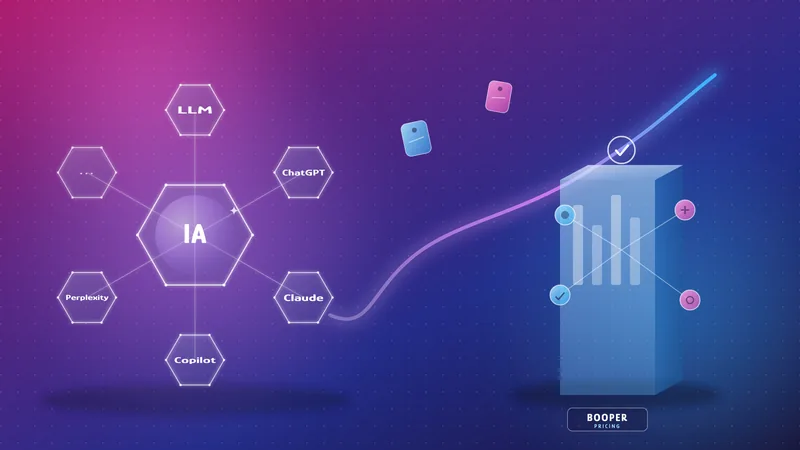
It has become increasingly common to compare two implementations of the same general-purpose language model before deciding which one to use to drive pricing; but the real question isn’t which one to choose, but where to position each one.
A general-purpose LLM lacks four key components required for pricing decisions: access to real-world data, explicit business rules, impact simulation, and explainable governance—these are the responsibilities of a specialized solution, not the LLM alone.
Generative AI projects that combine in-house expertise with that of a specialized partner have a significantly higher success rate than those developed solely in-house: 67% versus 22%.

Auditing a rule verifies that a calculation was executed correctly. Explaining a decision reconstructs the data, the expected demand, elasticity, cannibalization, the rules applied, and margin-volume trade-offs. According to Sage & IDC, 71% of financial executives would reject an AI tool that is 99% accurate if it cannot explain its answer.

A pricing tool faithfully processes the data provided to it; the quality of the results depends first and foremost on the quality of the input data. Three tasks are priorities before any configuration: a product catalog free of duplicates, synchronized prices and costs, and a continuous sales history. There’s no need to wait for perfect data to get started: an initial setup using files allows you to gradually improve reliability.
This is precisely what BOOPER’s Change Management module addresses: supporting teams to ensure that this data analysis does not hinder the adoption of the new tool.